Data types
It is common knowledge that only equitype values (values of the same type) can be added or subtracted. For example, apples can be added to apples, but apples cannot be added to square meters or to temperature. Similar limitations can be found in most modern algorithmic languages.
Like normal objects of life have certain types characterizing their color (red, blue, yellow, green), their taste (bitter, sour, sweet), amount (1.5, 2, 7), MQL4 uses data of certain types. Data type refers to the type of the value of a constant, of a variable, or the value returned by a function (for a full explanation of what a function is, see Functions).
In MQL4, the following data types are used (for the values of constants, variables, and the values returned by functions):
•int (integers)
•double (real numbers)
•bool (Boolean values, that is logical values)
•string (values of string type)
•color (values of color type)
•datetime (values of date and time)
Type int
Int type values are integers, also known as whole numbers. This type includes values that are integer by their nature. The following values are integers for example: the number of bars in the symbol window (16000 bars), the number of opened and pending orders (3 orders), the difference in points between the current symbol price and the order open price (15 points). Numbers representing such things can only be integers. For example, the number of attempts to open an order cannot be equal to 1.5, but only to 1, 2, 3 and so on.
There are two types of integer values available in MQL4:
•Decimal values can consist of digits from 0 through 9 and be either positive or negative: 10, 11, 12, 1, 5, -379, 25, -12345, -1, 2.
•Hexadecimal values can consist of Latin letters from A through F (or from a to f) and digits from 0 through 9. They must begin with 0x or 0X and take positive or negative values: 0x1a7b, 0xff340, 0xAC3 0X2DF23, 0X13AAB, 0X1.
Values of int type must be within the range from -2,147,483,648 through 2,147,483,647. If the value of a constant or a variable is beyond the above range, the result of the program operation will be void. The values of constants and variables of int type take 4 bytes of the memory of a computer.
Here are examples of using a variable of int type in a program.
int Art = 10;
int B_27 = -1;
int Num = 21;
int Max = 2147483647;
int Min = -2147483648;
Type double
Values of double type are real numbers that contain a fractional part.
Example values of this type can be any values that have a fractional part such as the incline of the supporting line, symbol price, or average number of orders opened within a day.
Sometimes you can face problems designating variables when writing your code, that is it is not always clear to a programmer to what type (int or double) the variable belongs. Let us consider a small example.
A program has opened 12 orders within a week. What is the type of variable A that considers the mean number of orders daily opened by this program? The answer is obvious: A = 12 orders / 5 days. It means that variable A = 2.4 should be considered in the program as double, since this value has a fractional part. What type should be the same variable A if the total number of orders opened within a week is 10? You can think that if 2 (10 orders / 5 days = 2) has no fractional part, variable A can be considered as int. However, this reasoning is wrong. The current value of a variable can have a fractional part consisting of only zeros. It is important that the value of this variable is real by its nature. In this case, variable A has also to be of double type. The separating point must also be shown in the constant record in the program: А = 2.0.
The values of real constants and variables consist of an integer part, a decimal point, and a fractional part. The values can be positive or negative. The integer part and the fractional part are made up of digits from 0 through 9. The number of significant figures after the decimal point can be up to 15.
For example, 27.12, -1.0 2.5001, -765456.0, 198732.07, and 0.123456789012345 are all acceptable double-type values.
The values of double type may range from -1.7 * e-308 through 1.7 * e308. In the computer memory, the values of constants and variables of double type take 8 bytes.
Here are examples of using a variable of double type in a program.
double Art = 10.123;
double B_27 = -1.0;
double Num = 0.5;
double MMM = -12.07;
double Price_1 = 1.2756;
Type bool
Values of a bool type are values of Boolean (logical) type that contain falsehood or truth.
In order to learn the notion of Boolean type, let us consider a small example from our everyday life. Say, a teacher needs to take account of the pupils' textbooks. In this case, the teacher will list all pupils on a sheet of paper and then will tick in a right line whether a pupil has a textbook or not. For example, the teacher may use tick marks and dashes in the table.
List of Pupils
|
Textbook on Physics
|
Textbook on Biology
|
Textbook on Chemistry
|
1 |
Smith |
V |
- |
- |
2 |
Jones |
V |
- |
V |
3 |
Brown |
- |
V |
V |
... |
... |
... |
... |
... |
25 |
Thompson |
V |
V |
V |
The values in right columns can be of only two types: true or false. These values cannot be attributed to either of the types considered above since they are not numbers at all. They are not the values of color, taste, amount and so on, either. However, they bear an important sense. In MQL4, such values are named Boolean, or logical, values. Constants and variables of bool type can take only one of two possible values: true (True, TRUE, 1) or false (False, FALSE, 0). The values of constants and variables of bool type take 4 bytes in the computer memory.
Here are examples of using a variable of bool type in a program.
bool aa = True;
bool B17 = TRUE;
bool Hamma = 1;
bool Asd = False;
bool Nol = FALSE;
bool Prim = 0;
Type string
Values of a string type are those represented as a set of ASCII characters.
In our everyday life, a similar content belongs to, for example, store names, car makes, and so on. A string value is recorded as a set of characters placed in double quotes (not to be mixed with doubled single quotes!). Quotes are used only to mark the beginning and the end of a string constant. The value itself is all of the characters framed by the quotes.
If there is a necessity to introduce a double quote ("), you should put a reverse slash (\) before it. Any special character constants following the reverse slash (\) can be introduced in a string. The length of a string constant ranges from 0 through 255 characters. If the length of a string constant exceeds its maximum, the excessive characters on the right-hand side will be truncated and the compiler will give the corresponding warning. A combination of two characters, the first of which is the reverse slash (\), is commonly accepted and perceived by most programs as an instruction to execute a certain text formatting. This combination is not displayed in the text. For example, the combination of \n indicates the necessity of a line feed; \t demands tabulation and so on.
A string is recorded as a set of characters framed by double quotes such as "MetaTrader 4", " Stop Loss", "Ssssstop_Loss", "stoploss", and "10 pips". The string value as such is the set of characters. The quotes are used only to mark the value borders. The internal representation is a structure of 8 bytes.
Here are examples of using a variable of string type in a program.
string Prefix = "MetaTrader 4";
string Postfix = "_of_my_progr. OK";
string Name_Mass = "History";
string text ="Upper Line\nLower Line";
Type color
Colors are stored as color data types.
The meaning of 'color' (blue, red, white, yellow, green and so on) is common knowledge. It is easy to imagine what a variable or a constant of color type may mean. It is a constant or a variable, the value of which is a color. It may seem to be a bit unusual, but it is very simple, generally speaking. Like the value of an integer constant is a number, the value of a color constant is a color.
The values of color constants and variables can be represented as one of three kinds: literals, integer representations, and color names.
Literals
The value of color type represented as a literal consists of three parts representing the numeric values of the intensity of three basic colors: red, green, and blue (RGB). The value of this kind starts with 'C' and is quoted by single quotes.
The numeric values of RGB intensity range from 0 through 255, and they can be recorded both decimally and hexadecimally.
Examples: C'128,128,128' (gray), C'0x00,0x00,0xFF' (blue), C'0xFF,0x33,0x00' (red).
Integer representation
Integer representation is recorded as a hexadecimal or a decimal number. A hexadecimal number is displayed as 0xRRGGBB, where RR is the value of red intensity, GG of green, and BB of blue. Decimal constants are not directly reflected in RGB. They represent the decimal value of a hexadecimal integer representation.
Representation of the values of color type as integers and as hexadecimal literals is very user-friendly. The majority of modern text and graphics editors provide information about the intensity of red, green, and blue components in the selected value of color. You have just to select a color in your editor and copy the values found in its description to the corresponding color value representation in your code.
Examples: 0xFFFFFF (white), 0x008000 (green), 16777215 (white), 32768 (green).
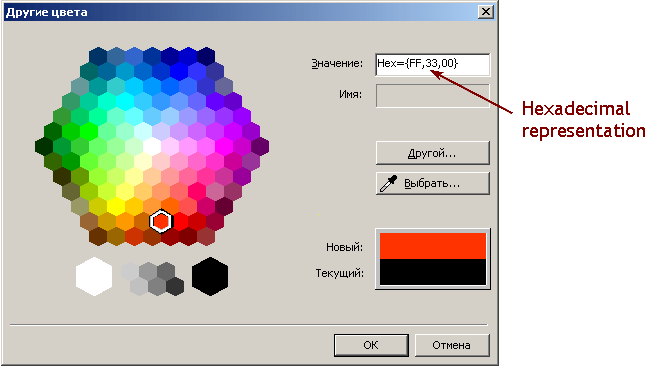
Figure 11 Color parameters for literal and integer representation of the constant color value can be taken in modern editors.
Color names
The easiest way to set a color is to specify its name according to the table of web colors. In this case, the value of a color is represented as a word corresponding to the color, for example, Red represents the color red.
clrBlack |
clrDarkGreen |
clrDarkSlateGray |
clrOlive |
clrGreen |
clrTeal |
clrNavy |
clrPurple |
clrMaroon |
clrIndigo |
clrMidnightBlue |
clrDarkBlue |
clrDarkOliveGreen |
clrSaddleBrown |
clrForestGreen |
clrOliveDrab |
clrSeaGreen |
clrDarkGoldenrod |
clrDarkSlateBlue |
clrSienna |
clrMediumBlue |
clrBrown |
clrDarkTurquoise |
clrDimGray |
clrLightSeaGreen |
clrDarkViolet |
clrFireBrick |
clrMediumVioletRed |
clrMediumSeaGreen |
clrChocolate |
clrCrimson |
clrSteelBlue |
clrGoldenrod |
clrMediumSpringGreen |
clrLawnGreen |
clrCadetBlue |
clrDarkOrchid |
clrYellowGreen |
clrLimeGreen |
clrOrangeRed |
clrDarkOrange |
clrOrange |
clrGold |
clrYellow |
clrChartreuse |
clrLime |
clrSpringGreen |
clrAqua |
clrDeepSkyBlue |
clrBlue |
clrMagenta |
clrRed |
clrGray |
clrSlateGray |
clrPeru |
clrBlueViolet |
clrLightSlateGray |
clrDeepPink |
clrMediumTurquoise |
clrDodgerBlue |
clrTurquoise |
clrRoyalBlue |
clrSlateBlue |
clrDarkKhaki |
clrIndianRed |
clrMediumOrchid |
clrGreenYellow |
clrMediumAquamarine |
clrDarkSeaGreen |
clrTomato |
clrRosyBrown |
clrOrchid |
clrMediumPurple |
clrPaleVioletRed |
clrCoral |
clrCornflowerBlue |
clrDarkGray |
clrSandyBrown |
clrMediumSlateBlue |
clrTan |
clrDarkSalmon |
clrBurlyWood |
clrHotPink |
clrSalmon |
clrViolet |
clrLightCoral |
clrSkyBlue |
clrLightSalmon |
clrPlum |
clrKhaki |
clrLightGreen |
clrAquamarine |
clrSilver |
clrLightSkyBlue |
clrLightSteelBlue |
clrLightBlue |
clrPaleGreen |
clrThistle |
clrPowderBlue |
clrPaleGoldenrod |
clrPaleTurquoise |
clrLightGray |
clrWheat |
clrNavajoWhite |
clrMoccasin |
clrLightPink |
clrGainsboro |
clrPeachPuff |
clrPink |
clrBisque |
clrLightGoldenrod |
clrBlanchedAlmond |
clrLemonChiffon |
clrBeige |
clrAntiqueWhite |
clrPapayaWhip |
clrCornsilk |
clrLightYellow |
clrLightCyan |
clrLinen |
clrLavender |
clrMistyRose |
clrOldLace |
clrWhiteSmoke |
clrSeashell |
clrIvory |
clrHoneydew |
clrAliceBlue |
clrLavenderBlush |
clrMintCream |
clrSnow |
clrWhite |
|
|
|
|
Constants and variables of color type take 4 bytes of computer memory. Here are examples of using such a variable in a program.
color Paint_1 = C'128,128,128';
color Colo = C'0x00,0x00,0xFF';
color BMP_4 = C'0xFF,0x33,0x00'
color K_12 = 0xFF3300;
color N_3 = 0x008000;
color Color = 16777215;
color Alfa = 32768;
color A = Red;
color B = Yellow;
color Colorit = Black;
color B_21 = White;
Type datetime
The datetime data type is used for date and time.
Values of this type can be used in programs to analyze the moment of beginning or ending of some events, for instance the release of important news, workday start/finish and so on. The constants of date and time can be represented as a literal line consisting of six parts that represent the numeric values of year, month, day (or day, month, year), hour, minute, and second.
The constant starts with "D" and is framed in single quotes. You may also use truncated values without date, or without time, or just as an empty value. The range of values is from January 1, 1970 through December 31, 2037. The values of constants and variables of datetime type take 4 bytes in the computer memory. A value represents the amount of seconds elapsed from 00:00 of January 1, 1970.
Here are examples of using a variable of datetime type in a program.
datetime Alfa = D'2004.01.01 00:00';
datetime Tim = D'01.01.2004';
datetime Tims = D'2005.05.12 16:30:45';
datetime N_3 = D'12.05.2005 16:30:45';
datetime Compile = D'';
Variable declaration and initialization
In order to avoid possible "questions" by the program about what type of data this or that variable belongs to, it is expected in MQL4 to explicitly specify the types of variables at the very start of a program. Before a variable participates in any calculations, it should be declared.
Variable declaration is the first mention of a variable in a program. At declaration of a variable, its type should be specified.
Variable initialization is when a value is given to a variable corresponding to its type at its declaration. Every variable can be initialized. If no initial value is set explicitly, a numeric variable will be initialized by zero (0) and a string variable will be initialized by an empty line.

|
In MQL4, it is expected to explicitly specify the types of variables at their declaration. The data type of a variable is declared at the first mention of the name of this variable, at its initialization. When it is mentioned for the second and all subsequent times, its type is not specified anymore. In the course of program execution, the value of the variable can change, but its type and name remain unchanged. The type of a variable can be declared in single lines or operators. |
A variable can be declared in a single line.
int Var_1;
This record means, in the given program, there will be variable Var_1 (variable declaration as such), and the type of this variable will be int.
Several variables of the same type can be declared in one line.
int Var_1, Box, Comm;
This record means there will be variables Var_1, Box, and Comm, all of int type, used in the program. It means the variables listed will be considered by the program as variables of integer type.
Variables can also be initialized within operators.
double Var_5 = 3.7;
This record means that there will be variable of double type, the initial value of the variable being 3.7.
The type of a variable is never specified anywhere in the subsequent lines of the program. However, every time the program calls a variable, it "remembers" that this variable is of the type that has been specified at its declaration. As calculations progress in the program, the values of variables can change, but their types remain unchanged.
The name of a variable has no relation to its type, that is you cannot judge about the type of a variable by its name. A name given to a variable of one data type in one program could be used for other variables of different types in different programs. However, the type of any variable can be declared only once within one program. The type of declared variables will not be changed during execution of the program.
Examples of variable declaration and initialization
Variables can be declared in several lines or in a single line.
It is allowed to declare several variables of one type simultaneously. In this case, variables are listed separated by commas, with a semicolon at the end of line.

Figure 12 Example of variable declaration in a single line.
The type of a variable is declared only once, at the first mentioning of the variable. The type will not be specified anymore for the second mention of the variable and all subsequent mentions.
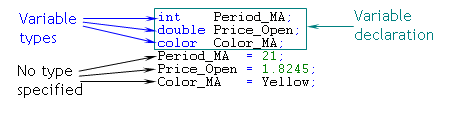
Figure 13 Example of variable declaration in a single line.
It is allowed to declare and initialize variables in operators.

Figure 14 Example of variable initialization.
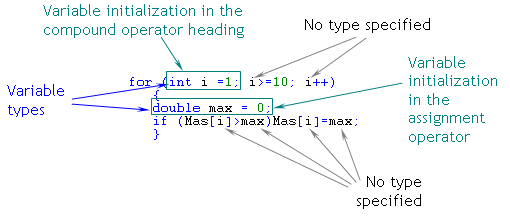
Figure 15 Variable initialization in the header of a compound operator.

 Basics of MQL4


